This is the daily reality for thousands of businesses that still treat PDF compression as a one-file-at-a-time chore. But organizations that switched to batch compression—processing dozens or hundreds of PDFs simultaneously—report a transformation in document delivery speed that directly impacts their bottom line.
The Document Delivery Bottleneck No One Talks About
Most professionals understand that large files cause problems. What they underestimate is the cumulative cost. Research shows that employees in document-heavy industries spend up to 30% of their workday searching for, waiting on, or manually processing file transfers. The average business PDF—a scanned contract, a financial report with charts, a presentation export—sits at 3.6 MB. That sounds manageable until you multiply it by the 50, 100, or 500 documents a department handles weekly.
- Gmail and Outlook enforce a 25 MB attachment limit—three or four uncompressed scanned documents exceed this
- Cloud upload links add friction: recipients must click, authenticate, and download separately
- Large files create 15–45 second upload delays per document on typical business internet connections
- Manual one-by-one compression eats 2–5 minutes per file including upload, processing, and download
- Version confusion multiplies when teams handle both compressed and uncompressed copies
What Batch PDF Compression Actually Means
Single-file compression tools process one PDF at a time. You upload a file, wait for the server to compress it, download the result, then start over with the next file. For five files, this takes roughly 15 minutes. For fifty files, it takes over two hours—assuming the tool does not crash, throttle, or require a paid upgrade mid-session.
Batch compression processes all files in a single operation. You select your entire folder of PDFs, choose a compression level, and the system handles every file simultaneously. The same fifty files that took two hours now finish in under three minutes. The difference is not incremental—it is a fundamentally different workflow.
Case Study: Processing Time Reduced from 24 Hours to 1 Hour
Gilmore Doculink, a document processing company handling high-volume print and digital distribution, measured their PDF workflow before and after implementing automated batch compression. Their test files—which previously took a full 24-hour cycle to process, optimize, and deliver—completed in just one hour after switching to batch compression. That is a 95.8% reduction in processing time.
The compression itself was only part of the improvement. By processing files in bulk rather than sequentially, the team eliminated the dead time between individual operations: the manual uploading, the waiting, the downloading, the re-uploading to the next system. Batch processing collapsed all of these steps into a single automated pipeline.
"The file sizes were reduced nearly 14 times while maintaining acceptable visual quality. What used to require a full day of processing now completes before the first morning meeting."
Case Study: Healthcare Organization Avoids $200K Server Upgrade
HWMG, a healthcare management group, faced a storage crisis. Years of accumulating unoptimized PDFs—patient records, insurance forms, compliance documents—had pushed their storage infrastructure to capacity. The IT department was preparing a $200,000 purchase order for a secondary disk array when they decided to test batch compression on their existing archive first.
- Total PDF storage reduced by 45%
- Daily backup window shortened by nearly half
- Server upgrade purchase deferred indefinitely
- HIPAA document integrity maintained across all compressed files
- Scanned documents dropped from an average of 12.4 MB to 1.9 MB per file
The key insight: they did not compress files one at a time. Their IT team processed the entire archive in scheduled batch runs—thousands of files per operation—which made the project feasible within a two-week window instead of the months a manual approach would have required.
Need to compress multiple PDFs right now? Try Batch Printer’s free PDF compression tool at batch-printer.com/tools/pdf/compress — works directly in your browser with no file uploads to external servers.
The 25 MB Email Problem and How Batch Compression Solves It
The most immediate pain point for most professionals is the email attachment size limit. Gmail, Outlook, and most corporate email systems cap attachments at 25 MB. A single high-quality scanned document can consume half that limit. A bundle of three or four contracts, invoices, or reports will trigger the "file too large" rejection every time.
Batch compression achieves typical compression ratios of 6 to 10 times for scanned documents. A 100 MB document bundle that would require a cloud sharing link compresses to 10–15 MB—well within email limits. For mixed-content PDFs with charts and text, compression ratios of 30–70% are standard while maintaining professional visual quality.
- Scanned contracts and forms: 50–97% reduction (12.4 MB → 1.9 MB typical)
- Presentation exports (PPT to PDF): 40–60% reduction
- Financial reports with charts: 30–50% reduction
- Image-heavy marketing materials: 60–80% reduction
- Text-only legal documents: 15–30% reduction with lossless optimization
How Browser-Based Batch Compression Works
Modern batch compression tools run entirely in your web browser. No file ever leaves your computer. The technology uses a two-stage approach to maximize file size reduction while preserving readability.
- Stage 1: Each PDF page is rendered to a high-resolution canvas using pdf.js, then re-encoded as optimized JPEG at the selected quality level
- Stage 2: If the JPEG approach produces a larger file (rare, but possible with text-heavy documents), the system falls back to lossless structural optimization—removing unused objects and compressing internal data streams
- Web Workers handle the heavy processing on background threads, keeping the browser responsive even with large files
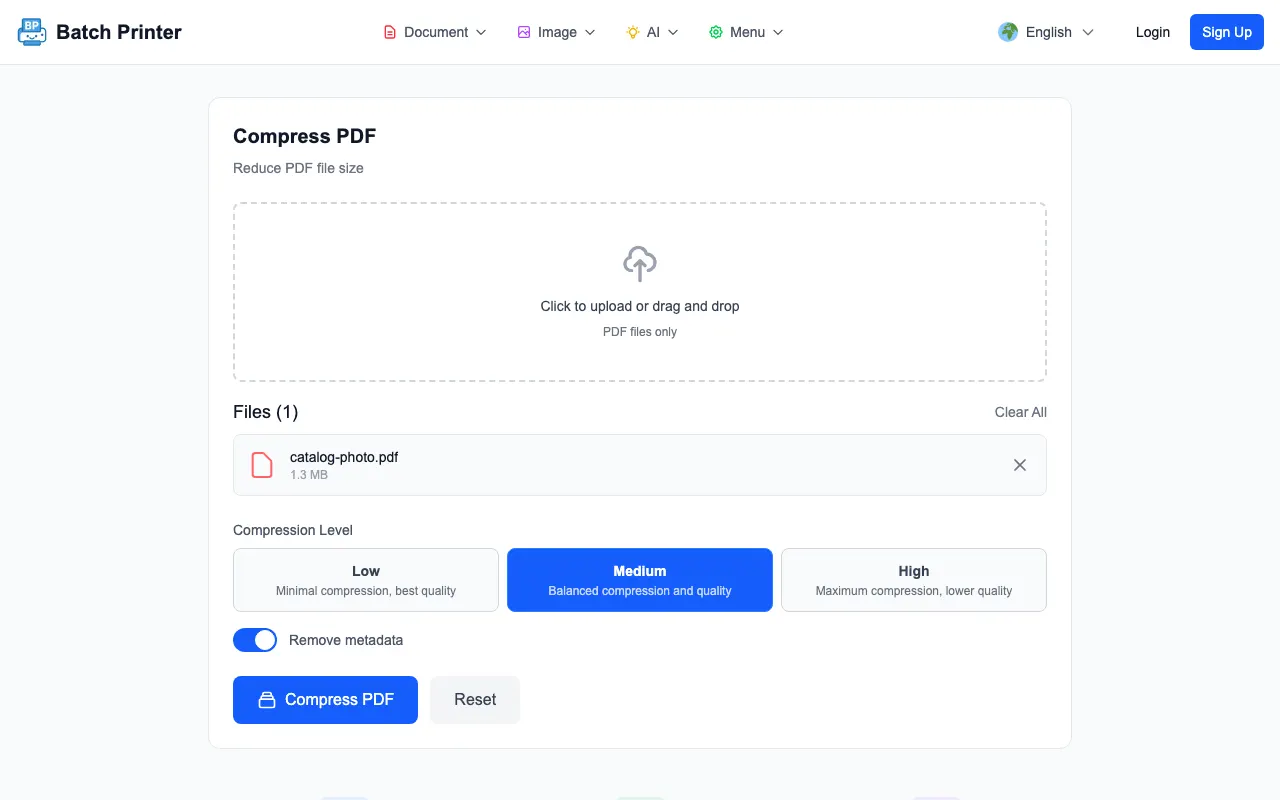
- Three compression presets let you balance quality against file size: Low (72% quality, minimal reduction), Medium (55% quality, balanced), or High (40% quality, maximum reduction)
- Optional metadata stripping removes hidden information like author names, creation dates, and editing history for additional size savings and privacy
Because processing happens locally in the browser, there is no upload wait time, no server queue, and no privacy risk. A 50 MB file processes at the same speed whether your internet connection is fiber or mobile data.
Industry Impact: Who Benefits Most from Batch Compression
Legal Firms: Contract Delivery Under Deadline
Law firms routinely send multi-document packages—signed agreements, exhibits, correspondence—under tight deadlines. A single real estate closing can involve 40 or more PDFs. Batch compression lets paralegals process an entire closing package in one operation, ensuring every document arrives under the email size limit without quality degradation that could affect legal readability.
Real Estate: Faster Transactions Close Faster
Real estate transactions generate enormous document volumes: inspection reports, appraisals, disclosures, title documents. Agents who compress these batches before sending report faster client response times and fewer "I could not open the file" support calls. Digital workflow optimization in real estate saves an average of $21.50 per transaction in processing costs alone.
Education: Course Material Distribution
Universities distribute lecture slides, reading materials, and assignment PDFs to hundreds or thousands of students simultaneously. UMass Amherst found that their interlibrary loan unit was spending hours processing PDFs manually before implementing automated batch compression, describing the previous workflow as "cumbersome and inefficient." Compressed files also load faster on student mobile devices, improving the learning experience.
Healthcare: Compliance Without Compromise
Medical organizations handle sensitive documents under strict regulatory requirements. Batch compression that runs locally—without uploading files to external servers—addresses HIPAA compliance concerns while still achieving the 45% storage reduction that HWMG documented. Patient records, insurance forms, and compliance documents all compress efficiently without compromising data integrity.
Processing sensitive business documents? Batch Printer compresses PDFs entirely in your browser—no files are uploaded to any server. Try it free at batch-printer.com/tools/pdf/compress
The ROI of Switching to Batch Compression
The business case for batch compression extends beyond time savings. When documents arrive faster, deals close faster. When files fit within email limits, communication friction disappears. When storage costs drop, IT budgets redirect to growth initiatives.
- Document processing speed: up to 96% faster (24 hours reduced to 1 hour)
- File size reduction: 45–85% across typical business documents
- Storage cost savings: 45% reduction in total PDF storage requirements
- Email deliverability: 100 MB document bundles reduced to under 15 MB
- Employee productivity: 30% reduction in time spent on document handling tasks
- Infrastructure savings: six-figure server upgrades deferred or eliminated
Best Practices for Batch PDF Compression
- Use Medium compression for most business documents—it balances readability with meaningful size reduction
- Reserve High compression for internal-only documents where visual perfection is less critical
- Use Low compression for client-facing materials where image quality must be pristine
- Strip metadata when documents will be shared externally to reduce size and protect privacy
- Compress before merging when combining multiple PDFs—individual files compress more efficiently than a single merged document
- Test one file from each document type first to find your optimal quality-to-size ratio
- Batch process during off-hours for archive optimization projects to avoid workflow interruption
Start Compressing PDFs Faster Today
Batch Printer makes PDF compression effortless. Upload multiple files at once, choose your compression level, and download optimized PDFs in seconds. Everything runs in your browser—no software installation, no account creation, no files leaving your computer. Your documents stay private while becoming small enough to email, fast enough to share, and lean enough to store affordably.
- Simultaneous compression of multiple PDF files in a single operation
- Three quality presets (Low, Medium, High) for precise control over file size
- Optional metadata removal for additional size savings and privacy protection
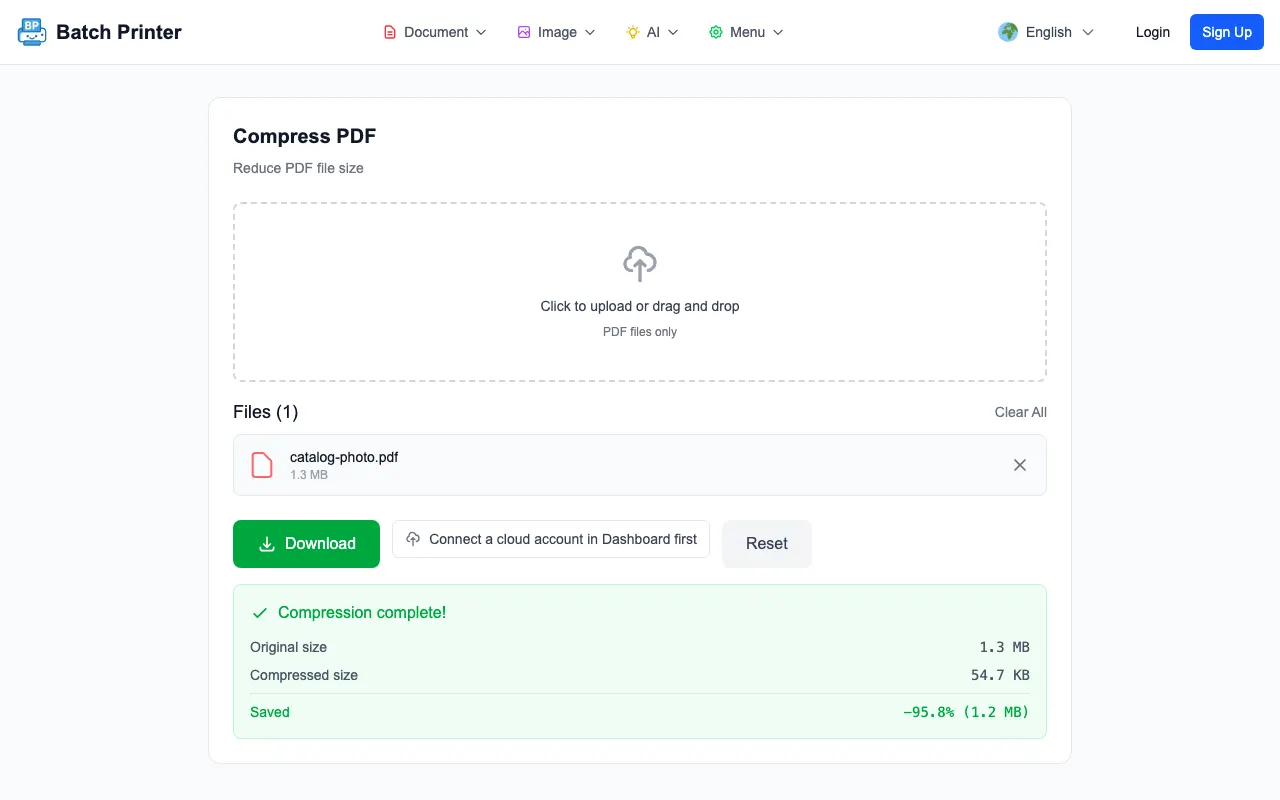
- Real-time progress display showing original size, compressed size, and savings percentage
- Zero server uploads—all processing happens locally in your browser
- Works on any device with a modern web browser—Windows, Mac, Linux, mobile
Ready to stop compressing PDFs one at a time? Compress all your files at once for free at batch-printer.com/tools/pdf/compress — drag, drop, done.