
Merge Word, PPT, and PDF Work Into One Reviewable Packet

Mixed Document Packets Need a Stable PDF Finish
A client packet, board pack, class handout, or project closeout often starts as several formats. The contract may begin in Word, the explanation may live in slides, and the appendix may already be a signed PDF. The useful productivity move is to turn those parts into one ordered PDF before review or printing.
Скористайтеся цими інструментами зараз
Натисніть кнопку, щоб одразу відкрити потрібний інструмент.
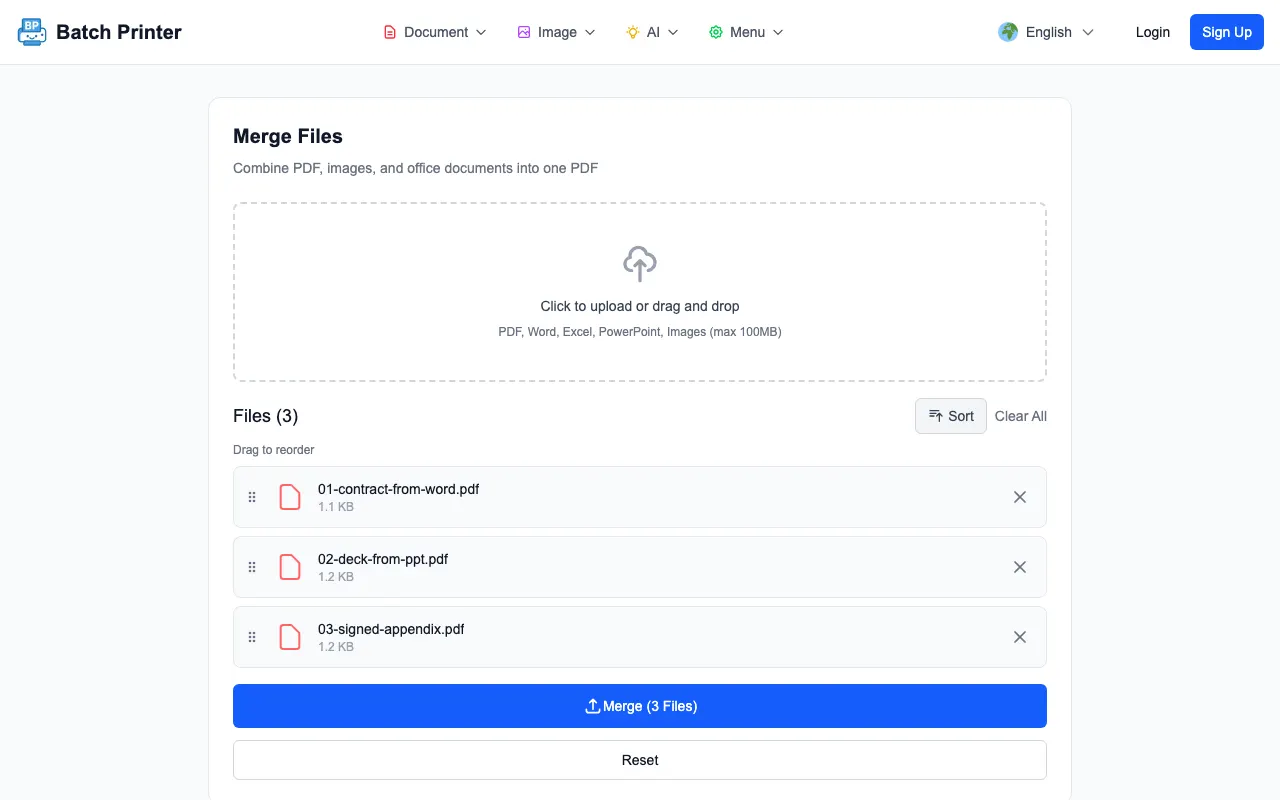
The walkthrough below uses three parts named the way a real project folder should be named: 01-contract-from-word.pdf, 02-deck-from-ppt.pdf, and 03-signed-appendix.pdf. The names encode the whole strategy - export or convert Office files first while you can still fix layout surprises, then merge the stable PDF parts into one packet.
Start by Turning Each Source Into a Reviewable Part
The mistake in mixed-format work is trying to solve conversion, ordering, review, and delivery at the same time. Separate the steps. First make sure the Word section, slide section, and existing PDF section each look correct on their own. Then merge the final parts in the order a reader should see them.
- A Word contract, memo, or narrative exported to PDF after final edits.
- A PowerPoint or slide deck exported to PDF with the intended slide size.
- Existing PDF attachments such as signed forms, receipts, or appendices.
- Image pages only when they belong in the packet and have been checked for orientation.
- Clear file prefixes so the merge queue reads in the same order as the final packet.
Observed Workflow: Word Export, Slide Export, PDF Appendix
On the merge page, the three parts sat in a queue with drag handles and a Merge (3 Files) button. The tool itself accepts PDF, images, Word, Excel, PowerPoint, and HWP inputs - but the pre-converted-PDF route shown here gives you a layout check on each part before anything is combined, which is why it is the route worth recommending.
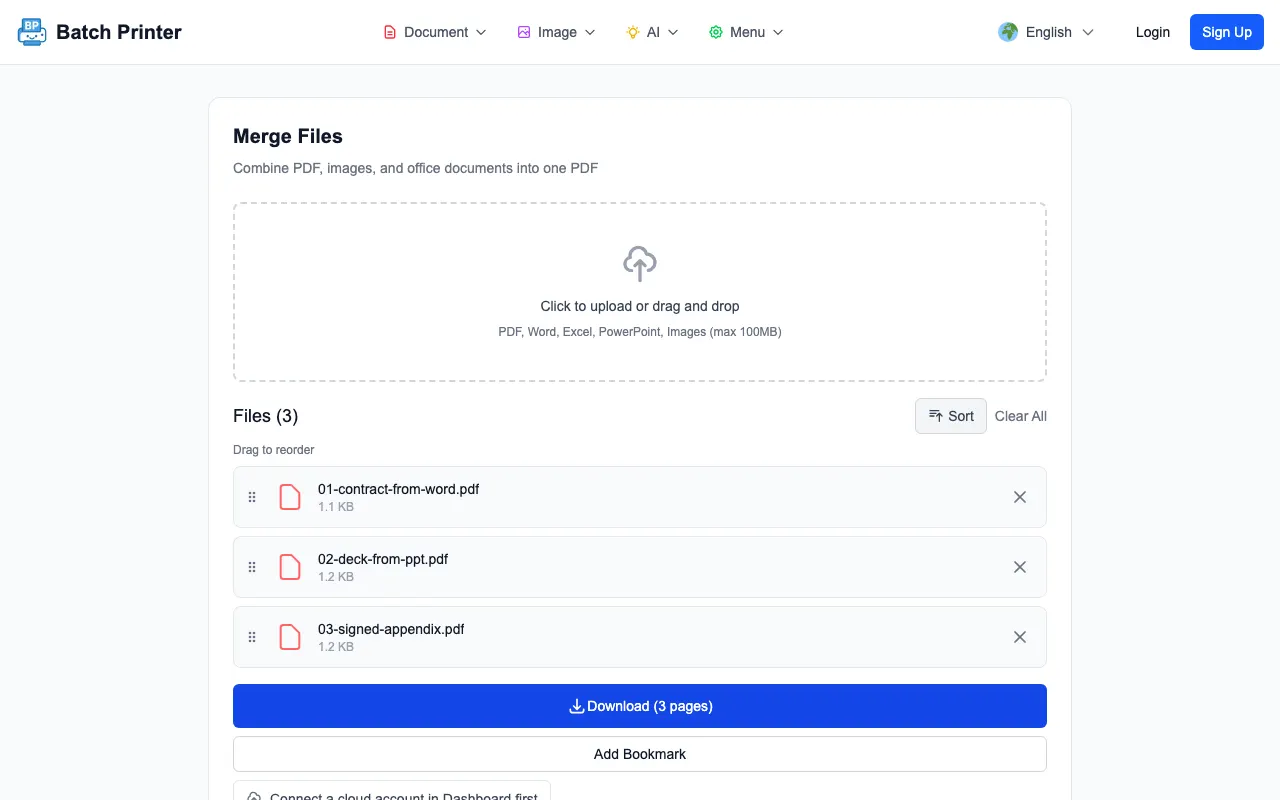
After merging, the page changed to Download (3 pages) and showed Created PDF with 3 pages. The downloaded test packet was 2,100 bytes because the sample documents were minimal. The useful observation is the state change: three separate parts became one verified output that could be opened once for review.
Merge Order Is the Productivity Gain
The gain is not a universal minute count. It is fewer decisions at handoff time. Once the packet is one PDF, reviewers do not need to ask which attachment comes first, whether the slides belong before the appendix, or which copy of the Word document is final. The page order becomes the workflow decision.
- Put the narrative or cover document first if the reader needs context.
- Place slide exports after the narrative when they explain the recommendation.
- Keep signatures, receipts, or evidence after the main explanation unless the recipient asks otherwise.
- Merge only the final versions, not drafts that should remain internal.
- Open the output and check the transition between each section before sending.
What I Would Not Automate Blindly
Do not blindly merge source files that have not been reviewed after conversion. A slide deck can export with unexpected margins. A Word document can reflow if fonts differ. A spreadsheet can create pages that are too wide. The final merge should happen after each section has already been checked in PDF form.
Also avoid merging documents that need different permissions or approval paths. If the signed appendix should only go to a subset of readers, keep it separate. One packet is best when every page belongs to the same audience and the same handoff.
A Practical Checklist for Client Packets
- File names: do they reflect the final order before upload?
- Page count: does the download state match the number of expected sections or pages?
- Section transitions: does the packet move from contract to slides to appendix in the intended order?
- Orientation: are any pages sideways or unexpectedly cropped?
- Recovery path: are the original source files still saved if one section needs replacement?
FAQ for Word, PPT, and PDF Merge
Should I merge the original Word and presentation files directly? If your account and workflow support that conversion path, you can try it. For high-stakes packets, I prefer exporting each office file to PDF first so the layout is visible before the final merge.
Does merging replace document review? No. It only combines page ranges into one packet. You still need to confirm the right versions, page order, and section breaks.
What if one section changes later? Replace that source section, export it again if needed, and rebuild the packet. Avoid editing the merged packet by hand unless the change is truly final.
Скористайтеся цими інструментами зараз
Натисніть кнопку, щоб одразу відкрити потрібний інструмент.