
End-of-Term Printing at a School Office: One Packet Instead of Forty Loose Files

End-of-Term Printing: Why PDF Packets Beat Sending Loose Files
Scale is what makes school printing hard. Take a 600-student elementary school at term end: a cover note, a calendar, a classroom notice, and a sign-off form per family means the office is not printing four documents - it is printing four documents six hundred times, in an order that has to survive the copier, the stapler, and the backpack. Loose files guarantee that somewhere in that chain, pages land out of sequence.
Скористайтеся цими інструментами зараз
Натисніть кнопку, щоб одразу відкрити потрібний інструмент.
A single packet is easier to reason about at every step. It gives the office one file to review, one page count to confirm against the copier settings, and one artifact to archive when the term closes. The packet-building method below is the routine to get there, checkpoint by checkpoint.
Building the Merge Queue: File Naming and Order Before You Upload
The most useful preparation happens before the browser opens. File names should make the intended order obvious so the queue is easy to inspect. In a school office, that can be as simple as adding short prefixes such as 01-cover, 02-calendar, and 03-family-form to the approved PDFs.
- A cover page that explains what the packet contains.
- A term calendar or closing schedule exported as PDF.
- A classroom notice that needs to stay with the family packet.
- A permission or sign-off form placed directly after its instructions.
- A final office checklist kept out of the family copy if it is only for staff.
This preparation matters because Batch Printer will only merge the files that are added to the queue. If a draft PDF or staff-only checklist is mixed into the upload folder, the tool cannot know that it should be excluded. The human review starts with the folder and continues in the queue.
Step-by-Step: Upload, Reorder, Merge, and Download
Walking a sample packet through the Batch Printer PDF merge page shows what the office will see. After upload, all three files appeared in one queue, including their file names and sizes. That visible list is the first checkpoint: before merging, the office can confirm that the right files are present and nothing extra hitched a ride.
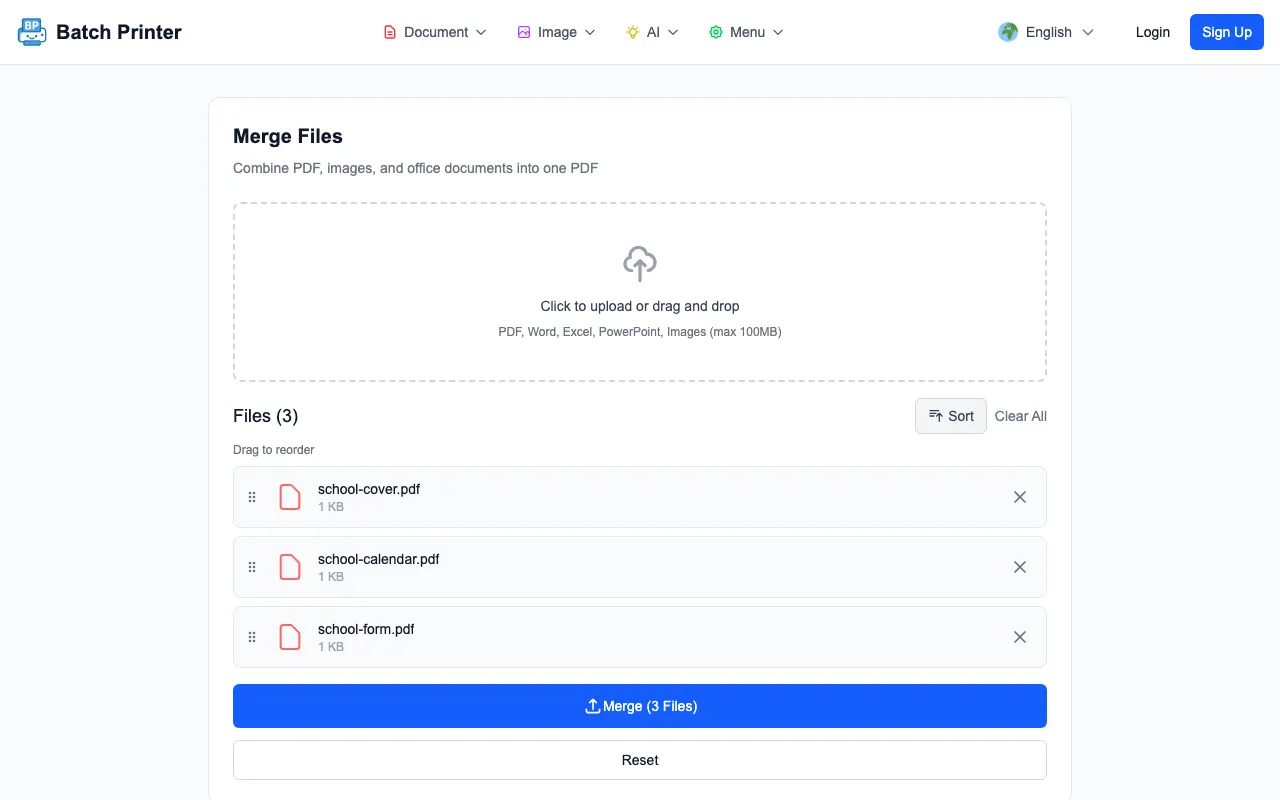
- Open the PDF merge page and add only the PDFs that belong in the packet.
- Read the queue from top to bottom and compare it with the packet checklist.
- Reorder files if the cover page, calendar, notice, or form is not in the intended sequence.
- Click the merge action and wait for the combined PDF state.
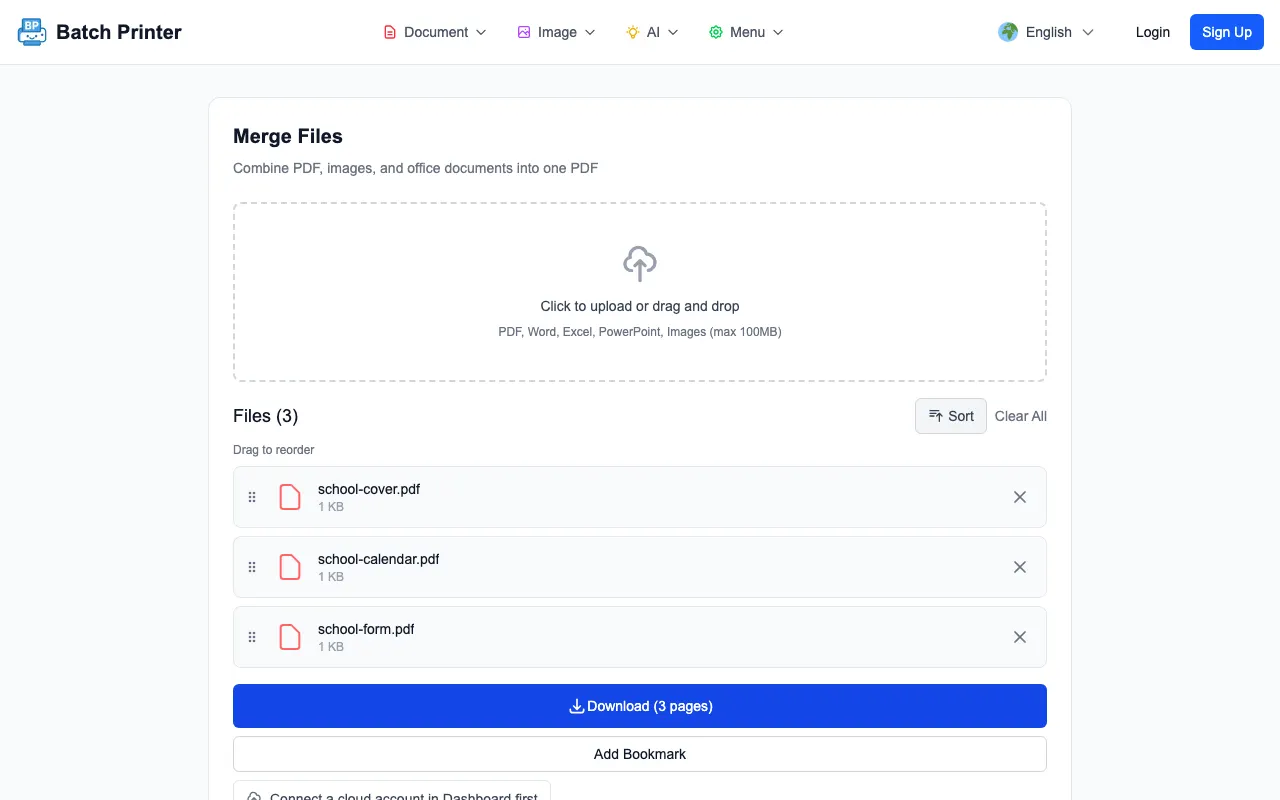
- Download the merged file and open it before using it in any school process.
What the Merger Accepts: File Type Limits to Know
For a school packet, PDF-only inputs are the safest assumption: PDFs in, one combined PDF out, no format surprises in between. The merge tool itself accepts broader document types, but a school office should not treat every format as interchangeable for a packet that six hundred families will receive.
If source files start as Word, PowerPoint, spreadsheet, image, or school system exports, convert or export them into reviewed PDFs first through an approved process. Then merge the approved PDFs. Keeping the packet stage PDF-only makes it easier to verify page order and reduces confusion about which application generated which page.
The merge tool also does not validate content. It does not decide whether a file is the current version, remove sensitive information, or replace school review procedures. It only assembles the uploaded files into one ordered PDF.
Before You Print: Three Things to Verify in the PDF
The output file should be treated as a review checkpoint, not as automatic approval. When the completed state shows the combined PDF is ready to download, the important next step is opening the file and checking it as a packet - not just trusting that a merge happened.
- Page order: the cover page, calendar, notice, and form should appear in the intended reading sequence.
- Packet membership: no draft, staff-only, or unrelated PDF should appear in the merged output.
- Readable pages: the first page, transitions between documents, and final page should render clearly.
Schools handle sensitive information, so the tooling never outranks the policy. Trial new workflows with non-sensitive samples, use approved devices and accounts, and follow the school policy for storing or deleting local downloads - the packet routine slots inside those rules, not above them.
Resetting for Next Term: Archiving and Clearing the Queue
The last step is operational cleanup. Save the final packet where the school expects it, using a name that separates the term, grade, or audience without exposing unnecessary personal details. Then clear the browser queue and remove temporary downloads that are no longer needed.
The reusable lesson is narrow but useful: a school office can reduce packet confusion when it starts with approved PDFs, uses a visible merge queue, and verifies one combined file before printing. The method is not a replacement for approvals or records systems; it is a cleaner way to handle the mechanical packet assembly step.
Скористайтеся цими інструментами зараз
Натисніть кнопку, щоб одразу відкрити потрібний інструмент.