
Fast PDF Merge: Combine Large Files Without Losing the Queue

Fast PDF Merging Starts With a Clean Queue, Not a Speed Claim
When a packet is heavy or deadline-driven, the risky part is not only waiting. It is losing control of the order, retrying after a bad input, or sending a merged PDF without opening it. A fast merge workflow should reduce those errors, not just make the progress indicator disappear.
Используйте эти инструменты сейчас
Нажмите кнопку, чтобы сразу открыть нужный инструмент.
Here is a useful reference point: a text-based report usually weighs 50-100 KB per page, while a 300-dpi scanned page can easily reach 1-3 MB. That means a 40-page scanned packet may be thirty times heavier than a 40-page exported one, and the merge behaves accordingly. The workflow below came from running a base report, an appendix, and a signed page through the Batch Printer merge queue and noting what each screen state tells you before you commit.
What I Checked in the Browser Merge Run
The test started with a base report, an appendix, and a signed page. I wanted the queue to answer three questions before any merge happened: did all files load, are the names recognizable, and is the planned order visible? Those are the same checks I would use before combining a larger scanned packet or a folder of project documents.
- Open one or two representative source files to confirm they are not blank or locked.
- Rename files with simple sequence numbers when the final order matters.
- Remove drafts, duplicates, and files that should stay separate.
- Close other heavy browser tabs if your device is already low on memory.
- Keep a copy of the source folder until the merged PDF has been reviewed.
Build the Queue Before You Think About the Download
After selecting the three PDFs, the live page showed a Files queue with each filename and file size. This is the best moment to catch mistakes. If a file is missing from the queue, the final PDF will not include it. If a signature page is in the wrong position, the final page sequence will be wrong even if the merge itself succeeds.
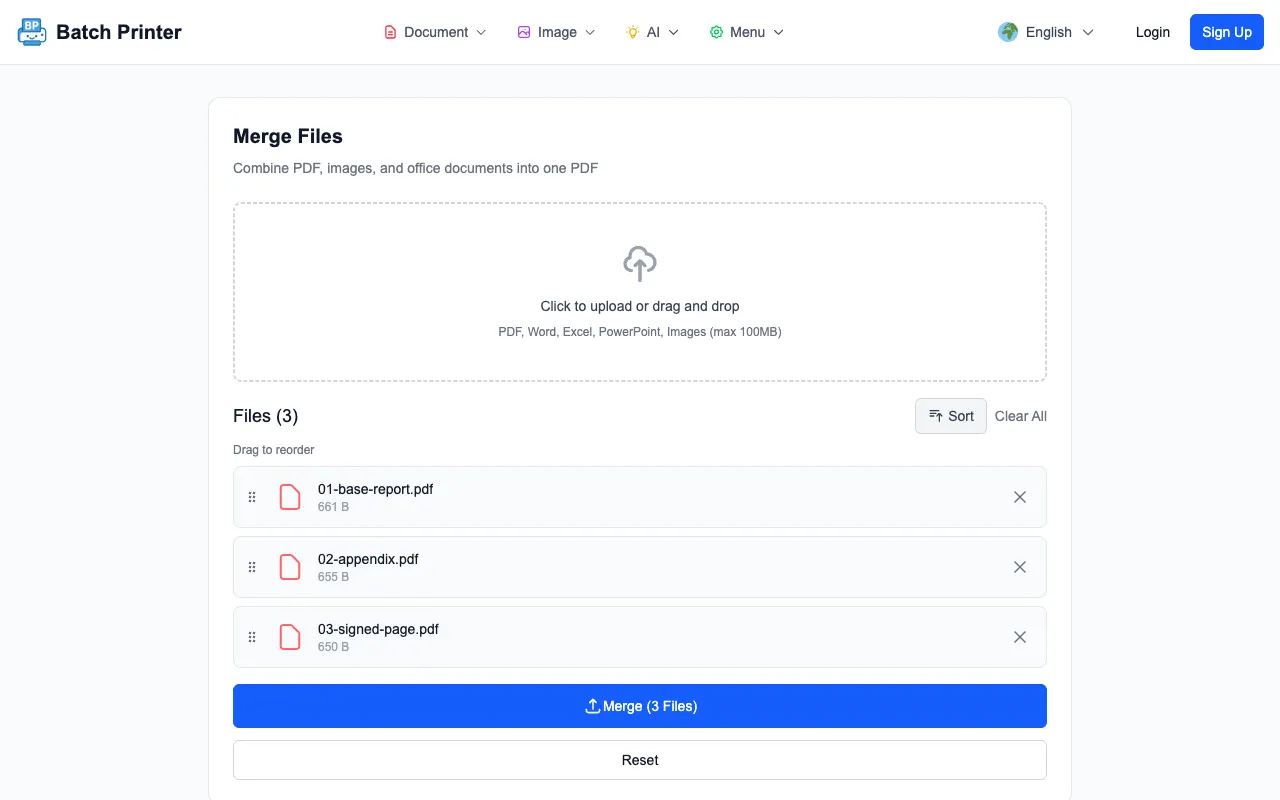
The queue is also where larger jobs become manageable. You can read file names top to bottom, compare them with the folder order, and reset if the selection was wrong. That is faster than downloading a combined file, discovering an order problem, and starting the entire task again.
Result Screen: What Confirms the Merge Finished
After I clicked the merge button, the page eventually showed a Download control and reported that the created PDF had three pages. That matched the three one-page PDFs in the test. For real work, I would still open the downloaded file because the result screen confirms output creation, not whether the packet is editorially correct.
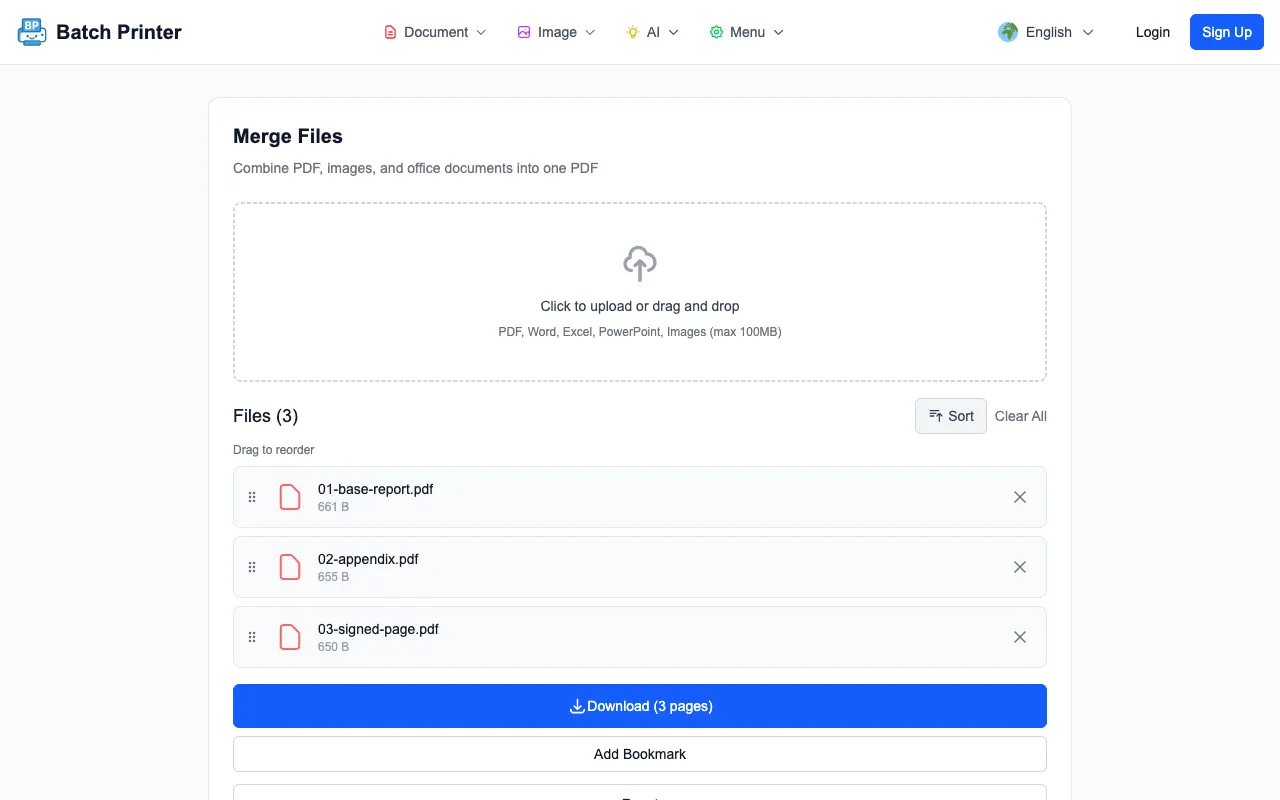
The practical review is quick: open the merged PDF, check the first page, check the joins between source files, and check the final page. If the file is going to a client, rename it clearly before sending. A clean filename is part of the workflow because recipients should not need to guess which merged copy is current.
Why Large Packets Still Need Preparation
Browser-side merging is convenient, but it still uses the device in front of you. A laptop with little free memory can struggle with very large scans, especially if the PDF pages are image-heavy. The honest expectation is that a clean queue and local processing reduce friction, while file quality and device capacity still matter.
- Try a small representative merge before combining an entire archive.
- Compress oversized scans before merging if they already open slowly.
- Split a folder into logical sections when the final packet would be hard to review.
- Avoid mixing password-protected PDFs into the queue until they are unlocked with permission.
- Use a stable desktop browser for important work rather than a nearly full phone.
How to Keep a Heavy Merge From Failing
Most preventable failures happen before the tool runs. Corrupted files, locked PDFs, duplicate drafts, and unclear filenames create more problems than the merge button itself. If a file will not open in a normal PDF viewer, fix that first. If a scan is huge because every page is a photo, consider compression before building the final packet.
When a merge does not finish, do not keep pressing the same button with the same inputs. Reduce the problem: merge a few files, identify the file that causes trouble, and rebuild from a cleaner set. That diagnostic approach is faster than repeated full retries.
When to Split the Job Instead
A single combined PDF is not always the best deliverable. Split the job when different reviewers own different sections, when a portal asks for separate uploads, or when a recipient only needs one chapter. Speed is useful only if the output matches the next step in the workflow.
Fast Merge FAQ
Does a fast merge prove the output is correct? No. It proves the browser created a combined file. Open the result to confirm order and completeness.
Should I merge every large folder into one PDF? Not always. Merge when one packet helps the recipient read, print, or archive the documents together.
Can I mix scans and exported PDFs? Yes, if they load correctly. The bigger concern is usually file weight and page orientation, not whether the source began as a scan.
Используйте эти инструменты сейчас
Нажмите кнопку, чтобы сразу открыть нужный инструмент.