
GIF Maker Online Free: Turn Loose Image Frames Into One Clean Animation

A GIF Maker Workflow Should Make Timing Visible
A useful GIF maker does more than accept a pile of images. It should show the frame order, expose the delay between frames, and make the final download obvious. That matters when the GIF is meant to explain a product step, show a quick before-and-after, or add a lightweight animation to documentation.
Используйте эти инструменты сейчас
Нажмите кнопку, чтобы сразу открыть нужный инструмент.
One detail surprises most first-time users: the GIF maker happily mixes image formats in a single animation. A PNG, a JPG, and a WebP went into one sequence for this guide, appeared as numbered frames 1 through 3, and came out as a single downloadable GIF preview after pressing Create GIF. The format juggling happens silently, which leaves you free to think about the two things that actually shape the result - frame order and timing.
Start With Frames That Tell One Small Story
GIFs work best when every frame advances the same tiny story. Three screenshots that show open, choose, download are easier to follow than ten unrelated images. Before opening the tool, put the source files in the order you want the viewer to see them and remove near-duplicate frames that only add weight.
- PNG frames when text, UI edges, or flat graphics need to stay crisp.
- JPG frames for ordinary photos where transparency is not needed.
- WebP frames when your source images already came from a web-optimized export.
- Same-size frames whenever possible, so the animation does not jump between shapes.
- A clear first frame, because some places show only the opening frame before playback starts.
The Three-Frame Walkthrough
The input was a three-frame chain at 900 x 600 pixels: a blue PNG, an orange JPG, and a green WebP, chosen so each frame was unmistakable in the preview. After upload, the tool showed Selected Files: 3, numbered each thumbnail from 1 to 3, and kept Add more and Clear controls visible beside the queue.
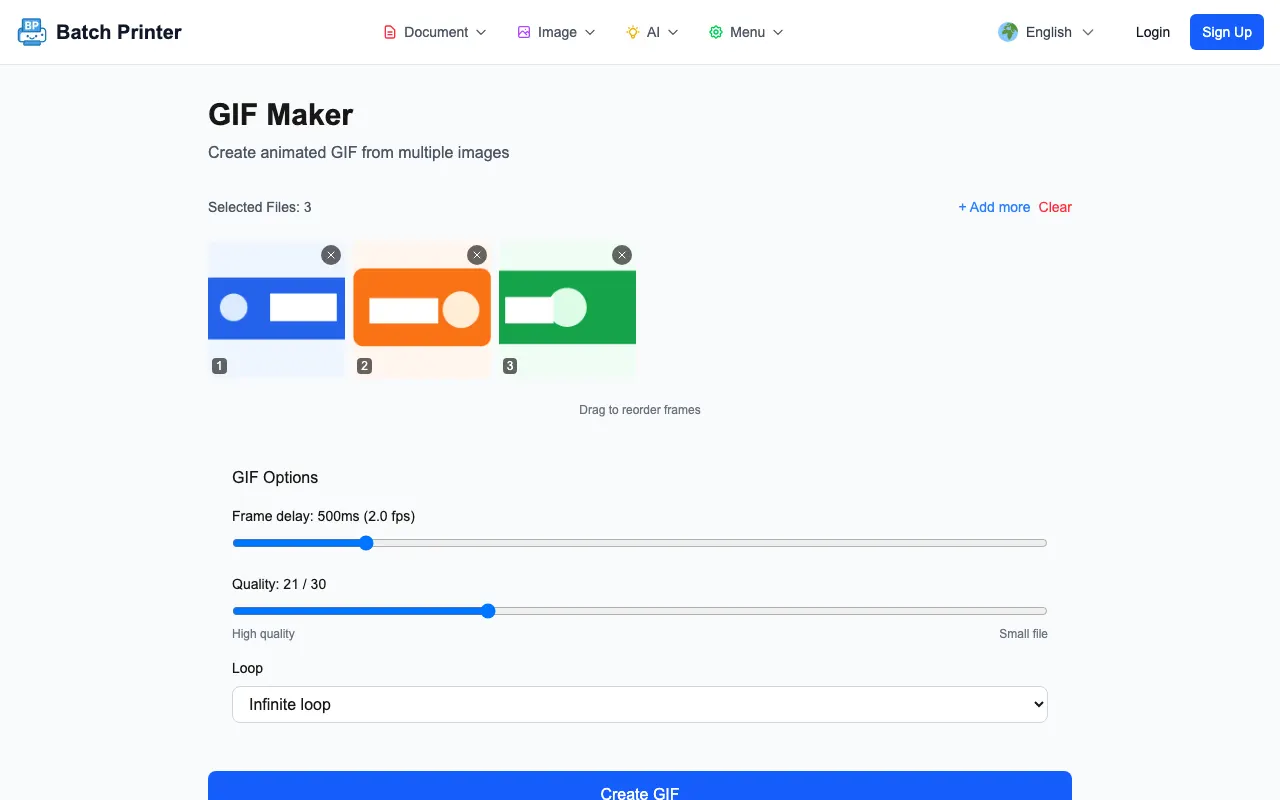
The default delay shown in the run was 500ms, which the UI labels as 2.0 fps. At that delay the output felt like a deliberate slide sequence rather than a fast animation. For a UI micro-demo I would test a shorter delay, but for a before-and-after product or process image, 500ms gives viewers time to understand each frame.
From Frame Queue to Generated GIF
After I clicked Create GIF, the result appeared below the options panel with a success message, an animated preview, and a Download button. The downloaded file from this small flat-color test was 45,901 bytes. That number should not be treated as a promise for every GIF: photo-heavy frames, larger dimensions, and longer frame chains will produce heavier downloads.
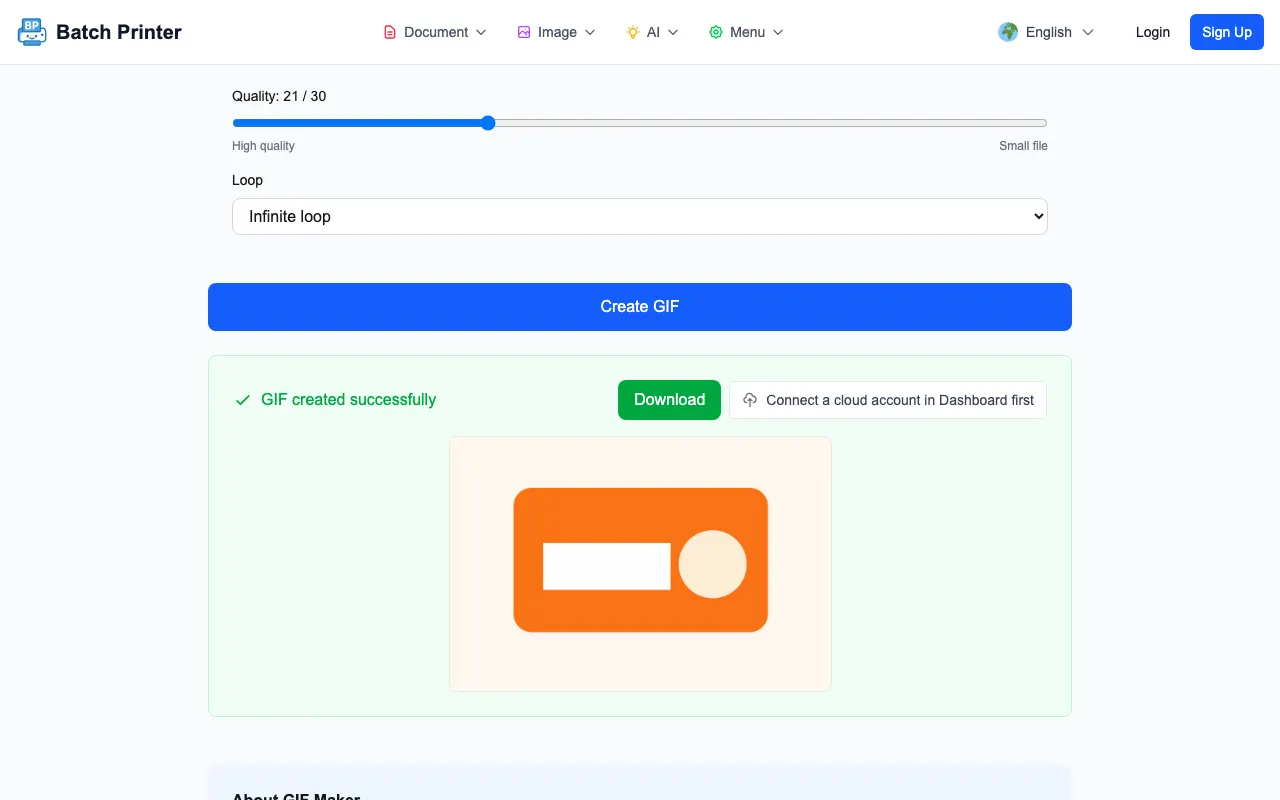
The important before-and-after detail was visible in the page itself. Before creation, the tool showed only the ordered source frames and settings. After creation, it showed the rendered preview. That gave me a chance to inspect pacing before using the file elsewhere.
Timing, Quality, and File-Size Tradeoffs
- Delay controls perceived speed. A longer delay makes each still frame readable; a shorter delay can feel smoother but may be harder to follow.
- Quality affects weight. Higher visual quality is useful for UI text and product edges, while lower quality can be acceptable for rough chat reactions.
- Dimensions matter before encoding. Shrinking source frames before creating the GIF usually reduces file weight more predictably than only moving the quality slider.
- Frame count is the easiest weight lever. If two frames show almost the same thing, remove one and preview again.
- GIF color limits can make gradients band, so flat graphics and simple product shots often look cleaner than subtle photo gradients.
Where GIFs Break Down
A GIF is not a replacement for video when you need sound, long duration, smooth motion, or sharp photographic detail. It is better for short loops where the viewer can understand the action in a few frames. If the source material is a detailed screen recording, export selected frames rather than trying to turn every moment into a GIF.
Also check where the GIF will be used. Some email clients, chat tools, and document viewers handle animation differently. The safe habit is to open the downloaded file once, confirm the first frame makes sense, and test it in the destination before replacing a static image.
GIF Maker FAQ
Can I mix image formats in one GIF? In the test run, the browser accepted PNG, JPG, and WebP files together and showed them as one ordered frame queue.
Does Create GIF download automatically? No - it first shows a success panel with a live preview and a Download button, which is the right order: you inspect the animation timing before the file ever lands in your downloads folder.
What should I check after download? Open the GIF, watch the first loop, and confirm the frame order, pacing, and visual quality. If it feels too heavy or too slow, reduce dimensions, remove frames, or change the delay.
Используйте эти инструменты сейчас
Нажмите кнопку, чтобы сразу открыть нужный инструмент.