
How to Merge PDF Files Online for Free Without Scrambling the Order

Merge PDFs Without Turning a Simple Packet Into a Filing Project
Merging PDFs sounds small until the final packet matters. A lease addendum, signed form, scanned receipt, and instruction sheet may all be correct on their own, but sending them as separate attachments invites mistakes: someone opens the wrong file first, misses the last page, or prints only part of the set. A single merged PDF gives the recipient one file, one page order, and one download.
To write this guide, I ran a 12-page contract PDF and a 3-page scanned addendum through the Batch Printer merge tool and screenshotted each state along the way. The merge itself took a few seconds; the part that actually prevents mistakes is slower and human. You can see the queue before anything is processed, which means the order question gets answered before the output exists, not after someone opens the wrong packet.
Before You Start: What Makes a Clean Merge
A PDF merge keeps the source documents as separate page ranges inside one new file. It does not rewrite the text, fix a bad scan, unlock a protected document, or decide which version is final. The quality of the merged output depends on the files you bring to the queue and the order you choose before pressing the merge button.
- Rename files so the order is obvious, such as application-main, application-appendix, and application-receipts.
- Open any important source file once to confirm it is not blank, corrupted, or password protected.
- Remove duplicate drafts before merging so the final packet does not include two versions of the same page.
- Put very large scans through a compression step first if your browser is already low on memory.
- Keep the originals in a folder until the recipient confirms the merged packet is acceptable.
Step-by-Step: The Five-Checkpoint Merge Workflow
Go to the Batch Printer PDF merge tool and start with the upload area. You can select files from your device or drag them into the page. In my test, the two PDFs appeared as separate queue cards, which made it easy to confirm that both files had loaded before doing anything else.
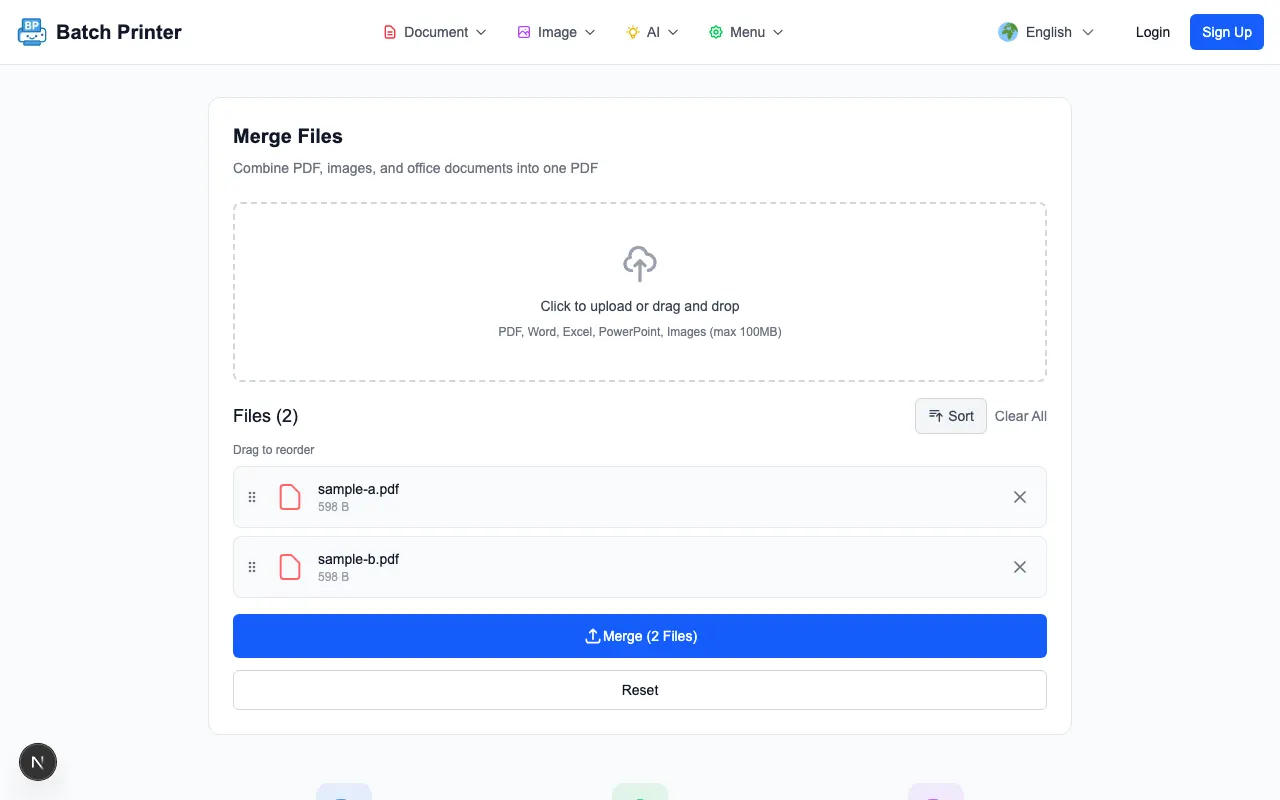
- Step 1: Add the PDFs. Wait until each file card appears in the queue so you know the browser has accepted the inputs.
- Step 2: Read the queue from top to bottom. The first file in the queue becomes the first page range in the merged PDF.
- Step 3: Reorder before merging. If an appendix, cover sheet, or signature page belongs somewhere else, move it now instead of fixing the output later.
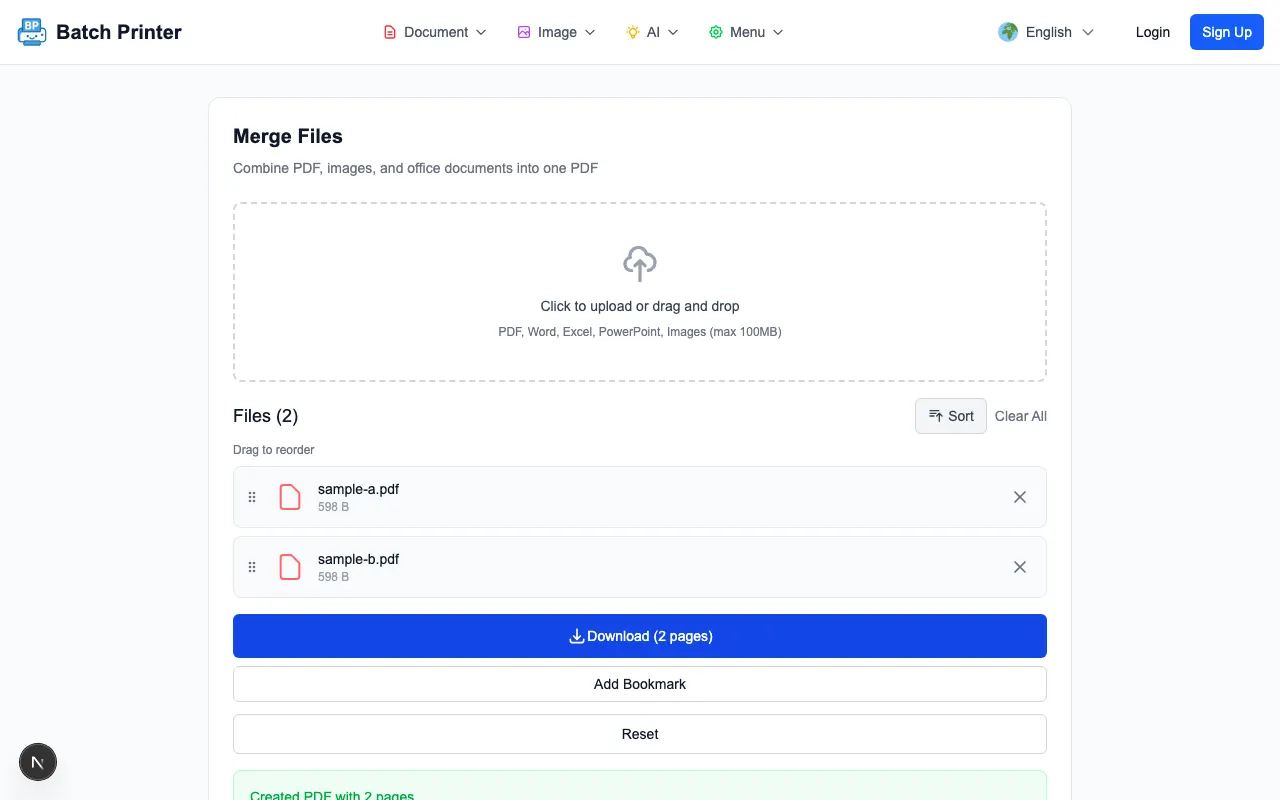
- Step 4: Start the merge only after the queue matches the packet you want to send. During testing, the merge result appeared on the same page as a download-ready output.
- Step 5: Download the merged file and open it once. Check the first page, the page transition between source files, and the final page before sending it onward.
What to Expect at Each Step
The queue is the most important screen in the workflow. If the queue is wrong, the merged file will be wrong. In the tested run, the result did not invent a new cover page, add a visible watermark, or ask for account details before the browser-side PDF merge completed. The output was simply a combined PDF ready to save.
The final quality check should be visual and practical. Do not only look at the file name. Open the result, scroll through the join between documents, and make sure the final page is present. This catches the most common human error: selecting the right files but placing them in the wrong sequence.
Tips and Edge Cases From the Test Run
- Order matters more than upload time. A file added later can still belong at the beginning of the packet.
- Password-protected PDFs may not merge cleanly until you unlock them with permission from the document owner.
- Browser-side processing is convenient, but extremely large scans can still strain an older laptop or phone.
- If a source PDF is sideways, rotate it before merging so the final packet does not mix orientations.
- If your recipient needs separate signatures on separate forms, merge only after signing is complete.
When Not to Merge
Merging is not always the right move. Keep files separate when each document has a different owner, when a reviewer must approve one attachment at a time, or when the receiving system asks for individual uploads. A single PDF is excellent for reading and printing, but it can be inconvenient when someone needs to replace only one component later.
Alternative Approaches If the Browser Merge Is Not Enough
If the merge fails because the inputs are too heavy, first reduce scan size with a compression tool and try again. If the files require editing, fix the source documents before combining them. If a workflow involves Word, spreadsheet, or slide files, convert those documents to PDF first so the final merge step has stable PDF inputs.
FAQ for PDF Merging
Does merging change the content of my pages? In normal PDF-to-PDF merging, the goal is to combine page ranges rather than rewrite page content. Still, always open the output because bad source files remain bad after a merge.
Can I merge scans and exported PDFs together? Yes, as long as the files load correctly in the merge queue. The practical issue is usually file weight, not whether the page began as a scan.
Should I keep the original files? Yes. Keep the originals until the merged file has been accepted. That gives you a clean recovery path if someone asks for a different order or one document needs replacement.